Configure the WinRoute Firewall
|
| |
| " Download rules " Install " Activate
|
|
| |
|
Having installed Winroute (at least release 4.x) is required then you can go further :
|
|
Complete ruleset :
Clic on the link below to download !!!!
Warning, this ruleset was recently improved and is now network capable.
winroute_full.reg, registry file describing ruleset and the Winroute configuration.
|
| |
|
How intalling the security ruleset ?
1 - Stop Winroute
First close the 'Winroute Administration' module if it is active.
The stop the filtering module. In the 'systray' :
make a right clic on 'Winroute Engine' and choose "Stop Winroute Engine" in the menu, then the icon shows :
2 - Installing the rules
Double clic on the winroute_full_xxxx.reg you donwloaded.
The below message prompt :

3 - Restart winroute
Restart the module 'Winroute Engine', by the menu "Start Winroute Engine" on the icon 'Winroute Engine' in the 'systray', which now shows :
Then run Winroute Admin int he Start Menu -> Progams -> Winroute :
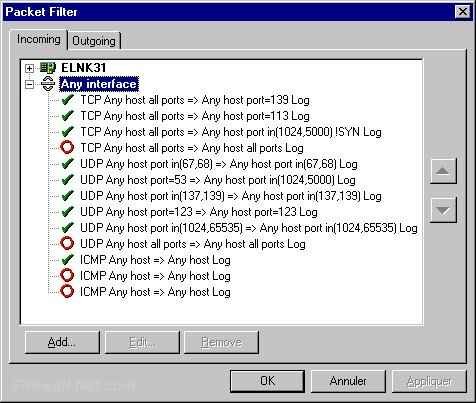
In the menu Settings -> Advanced -> Packet filter you should read something like :
The both tabs should look like the uppers.
If not, this might be a problem, feel free to send an e-mail.
|
| |
|
How activating this security ruleset ?
Hence installed this ruleset is activated (if the module 'Winroute Engine' is up).
|
| |
|
For Windows Me
You must use a release at least equal to 4.1 build 23 (this one is a beta release).
|
| |
|
How to be warned of ruleset updates ?
Simply by joining th mailing list on the home page.
|
|
D - Everything seems ok
|
You can try the checking.
|
| |
If you have problems read the FAQ.
|
| |