| Firewall Net | tests, installation & configuration |
|---|---|
|
|
|
||||||||||||||||||||||||||||||||||||||||||||||||||||||||||||||||||||||||||||||||||
Configure Norton Internet Security |
|
This firewall product tests results are : 8.05 / 20 ! After having installed Norton Internet Security , you can do the following : |
|
|
How to configure it ?
|
|
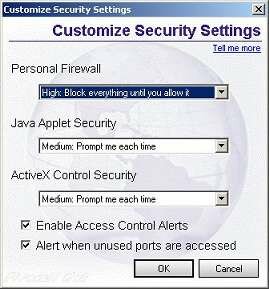
2. Click on the Norton Internet Security icon (in the systray) and select the Personnal Firewall tab : Choose to Enable security and the Custom Level... (press the button) :
Customizing the security level choose the following options :
|
|
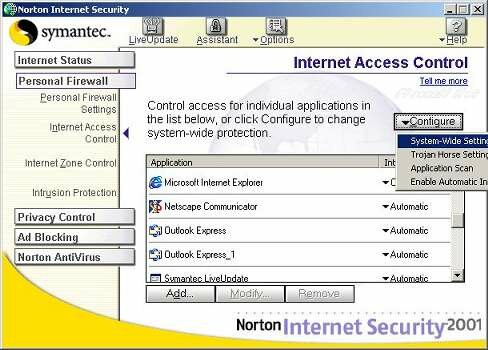
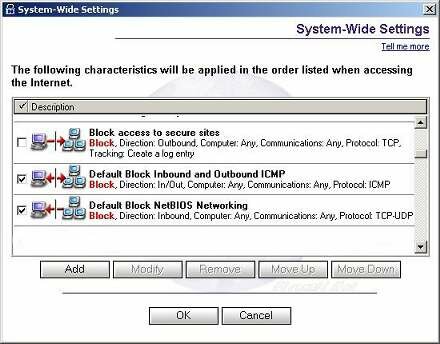
3. In the Internet Access Control tab , choose to Configure System Wide settings :
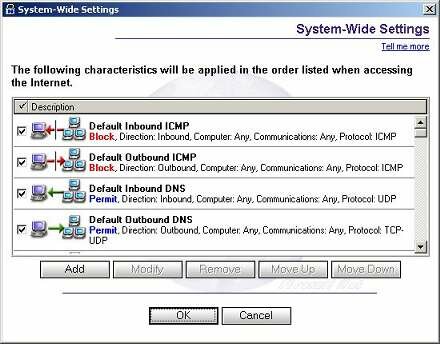
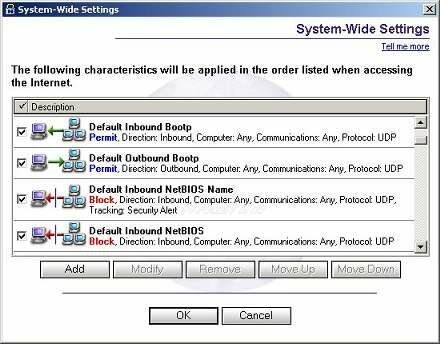
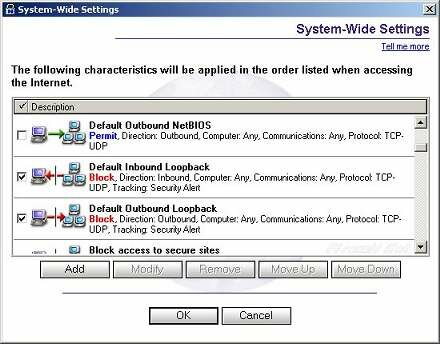
And then apply the same security rules exactly as shown in the 4 pictures below :
|
|
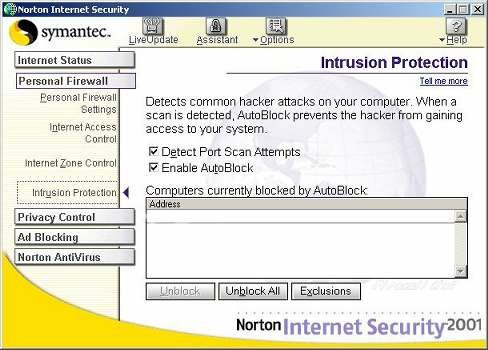
4. Then go to the Intrusion Protection Tab and be sure that both options are checked :
Normaly it's finished, you'll find in the Log tab every connections attempts. |
|
|
|
If you have problems, don't forget to send the copy of your log and a short description of your configuration in your e-mail. |
| This site is copyright © Chryjs 1999-2003, all copies forbidden. | |||